
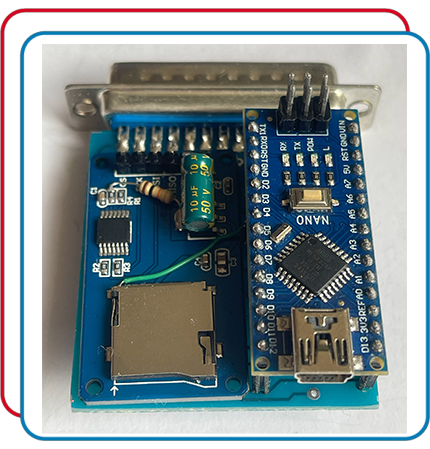
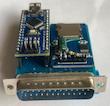
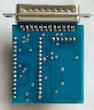
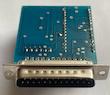
SD-Box The New Generation برای تمامی آمیگا ها
نسل جدید بهترین و سریع ترین راه انتقال فایل به دنیای آمیگا
با این دستگاه کوچک و کاربردی، آمیگا 500 / 600 / 1200 خود را به یک سیستم مدرن تبدیل کنید.
فایل ها را مستقیماً از کارت SD روی Workbench لود کنید و به راحتی روی فلاپی ذخیره و اجرا کنید.
ویژگی های اصلی SD-Box
لود بسیار سریع بازیها و برنامه ها بر روی فلاپی
انتقال راحت فایل از کامپیوتر با یک کارت SD بدون نیاز به درایو فلاپی
سازگاری کامل با Workbench
استفاده از میکروکنترلر اصلی ATmega328P
نصب و استفاده بسیار آسان فقط وصل کنید و اجرا کنید
طراحی حرفه ای و تولید با کیفیت
مزایای نسخه تولیدی ما
تولید انحصاری فروشگاه C128.ir
کیفیت ساخت بالا و تست شده روی چندین مدل مختلف Amiga
ارائه آخرین نسخه Firmware و نرم افزار SD Box Server
ابعاد کوچک، وزن کم، قابل حمل و ایده آل برای گیمرهای رترو
مناسب برای:
گیمرها و طرفداران دنیای آمیگا
مجموعه داران و تعمیرکاران سیستم های Retro
کسانی که از سرعت کم فلاپی خسته شدهاند
فروشگاه های Retro و مجموعه داران حرفه ای
پیشنهاد ویژه
اگر یک آمیگای کلکسیونی دارید، SD-Box بهترین ارتقا برای لذت بردن از بازی ها و برنامه های رترو است.
چرا این محصول انتخاب اول کاربران آمیگا شده است؟
مقرون به صرفه ترین حافظه جانبی برای Amiga
سرعت بارگذاری چندین برابر بیشتر از فلاپی
سازگاری کامل با کارتهای SD تا ظرفیت 32GB
اقلام همراه محصول
آخرین نسخه SD Box Server
یک عدد فلاپی Workbench 1.3 ورژن 34.20
دارای برنامه کامل Install SD-Box
راهنمای نصب مهم (حتماً مطالعه شود)
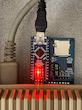
پس از اتصال SD-Box، برق 5 ولت (Type-B قدیمی) را با یک شارژر موبایل معمولی به دستگاه وصل کنید.
کارت SD شامل برنامه های مورد نظر را در لانچر SD-Box قرار دهید.
فلاپی Workbench را در درایو آمیگا قرار دهید و اجازه دهید سیستم کامل بوت شود.
پس از لود کامل Workbench، آیکن SD-Box را اجرا کنید.
در پنجره بازشده، گزینه DF0 را انتخاب کنید.
صفحه ای باز می شود که در آن یک نوار شبیه کاغذ A4 مشاهده می کنید.
با کلیک روی آن، لیست برنامه های موجود روی کارت SD نمایش داده می شود.
نکات مهم
این کالا بدون مموری حافظه ارسال می شود
این کالا یک دستگاه الکترونیکی حساس است و مرجوعی ندارد.
قبل از ارسال، فیلم تست و سلامت دستگاه با ذکر نام خریدار ضبط و ذخیره می شود.
اگر سوالی دارید، قبل از ثبت سفارش بپرسید تا بهترین مشاوره را از من دریافت کنید.
SD-Box The New Generation & the Fastest Way to Transfer Files to Your Amiga
Turn your Amiga 500 / 600 / 1200 into a modern system with this compact and powerful device
Load files directly from an SD card into Workbench, and easily save and run them from a floppy disk
Main Features of SD-Box
Ultra-fast loading of games and applications onto floppy
Easy file transfer from PC using an SD card no floppy drive required
Full compatibility with Workbench
Powered by the original ATmega328P microcontroller
Extremely easy to install and use simply plug and run
Professionally designed and high-quality construction
Advantages of Our Version
Exclusive production by ZIG Shop
High-quality assembly, fully tested on multiple Amiga models
Comes with the latest Firmware and SD Box Server
Compact size, lightweight, and easy to carry
Perfect For:
Amiga gamers and enthusiasts
Retro system collectors and technicians
Anyone tired of slow floppy drive loading times
Retro stores and professional collectors
Special Recommendation
If you own a collectible Amiga, SD-Box is the best upgrade to enhance your retro gaming and software experience
Why This Product Is the First Choice Among Amiga Users?
The most cost-effective storage solution for Amiga
Loading speeds many times faster than a floppy disk
Full compatibility with SD cards up to 32GB
Included with This Product
Latest version of SD Box Server
One Workbench 1.3 Version 34.20 floppy disk
Full SD-Box Install program
Important Installation Guide (Please Read Carefully)
After connecting SD-Box, provide 5V power (old Type-B connector) using a standard phone charger
Insert the SD card containing your programs into the SD-Box launcher
Insert the Workbench floppy into the Amigas floppy drive and allow it to fully boot
After Workbench is loaded, run the SD-Box icon
In the opened window, select DF0
A window will appear showing a strip resembling an A4 paper icon
Click on it your SD cards program list will be displayed
Important Notes
This is an electronic device and cannot be returned
Before shipping, a full test video showing the device working will be recorded with the buyers name for confirmation
If you have any questions, please feel free to ask before placing your order, so I can provide the best guidance